Before writing a single line of code, I map the entire client journey and system design. Here’s how I planned this automated enrollment-to-delivery platform.
I once saved my team two hours a day by moving one piece of paper.
They were picking up the packing list, reading an item, putting the list down, getting the item, picking the list back up. Over and over. I duct-taped a clipboard to their trolley handles. Ugly solution. Real time savings.
That moment taught me something critical: The best systems come from watching where people fall into holes, get confused, or drop off. You can’t design good automation without understanding the actual workflow first.
So before I write a single line of code for this wellness coaching platform, I spend days mapping friction points and system design. Because the difference between a system that works and one that creates new problems is entirely in the planning stage.
This is Part 1 of a three-part series documenting this build. Today: the planning stage—customer journey mapping and system design.
The Problem This System Solves
I see this constantly in the wellness space. Coaches are drowning in manual admin. They’re sending 8-12 emails per new client just to get them from purchase to portal access. They’re answering the same questions over and over. They’re spending 10-15 hours a week on tasks that should take minutes.
It’s the same pattern I saw in my own business before I built proper automation. You hire someone to handle the admin. They get overwhelmed. You hire another person. The problem doesn’t go away because the problem isn’t staffing—it’s systems.
Customer friction points:
- 8-12 manual emails per client enrollment
- 2-5 days from purchase to portal access
- 10-15 hours/week on admin instead of coaching
- Same questions answered repeatedly
- Clients confused about next steps
- No systematic way to gather feedback or testimonials
- Missing upsell opportunities because there’s no follow-up system
The Solution Design
What I’m building:
A complete WordPress platform that automates the entire client journey from discovery through ongoing program delivery—and captures the feedback and testimonials that grow your business.
Key components:
- Program showcase pages – Clear offerings, transparent pricing, self-education
- WooCommerce checkout – Streamlined purchase flow
- Automatic account creation – No manual setup
- Client portal – Self-service hub for everything
- Coach dashboard – Client management and progress visibility
- Email automation – Right message, right time, zero manual work
- Progress tracking – Milestone completion and program visibility
- Feedback & testimonial system – Automated requests at key milestones, builds review bank
- Follow-up sequences – Upsell opportunities, next program suggestions, retention automation
Business integrations:
- Payment processing – Stripe integration for cards, Apple Pay, Google Pay
- Accounting sync – Automatic invoice creation in Xero or QuickBooks
- Email marketing platform – Client list sync with Mailchimp, ConvertKit, or ActiveCampaign
- Calendar integration – Google Calendar or Calendly for practices with 1:1 sessions
- CRM connection (optional) – For practices that need centralised client data
The platform doesn’t exist in isolation. It connects to the tools practitioners already use so data flows automatically—no manual exports, no double-entry, no syncing spreadsheets at midnight.
In my grocery business, we had beautiful automation for order processing. But someone still had to manually enter revenue data into our accounting software every week. That person was me. At midnight. On Sundays.
When I finally built the integration between our order system and Xero, I got three hours of my life back every week. That’s when I learned: the automation inside your platform is only half the job. The integration with your business tools is what actually saves time.
Customer Journey Blueprint
This is where I map every single touchpoint—before and after automation.
BEFORE (Manual Way)
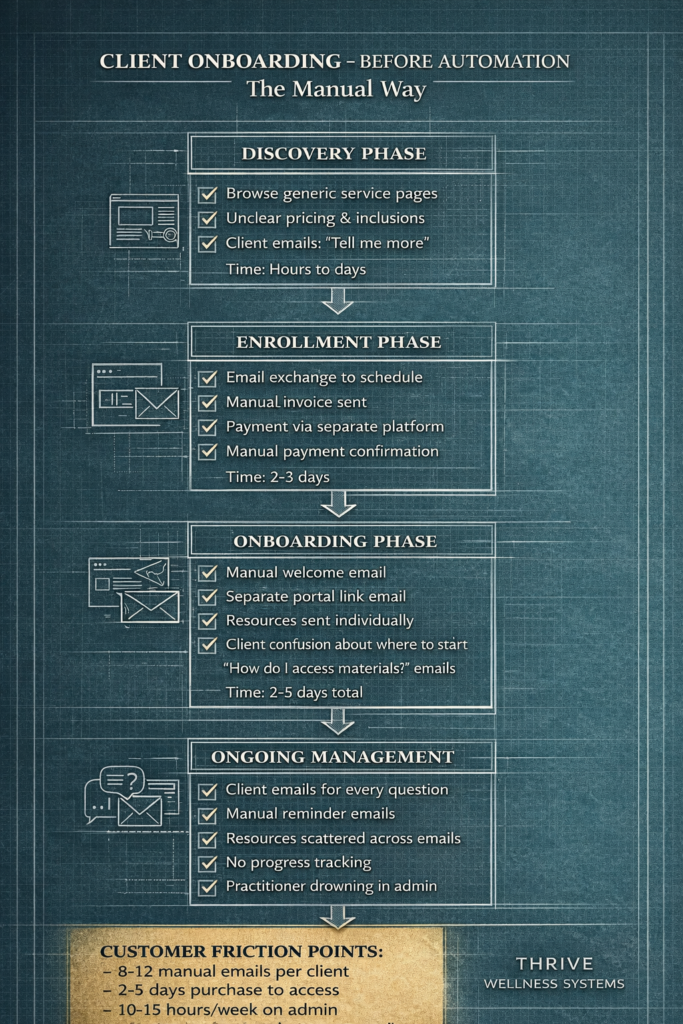
The manual enrollment process I see wellness coaches using:
- Discovery: Generic pages, unclear pricing, client emails “tell me more”
- Enrollment: Email exchange to schedule, manual invoice sent, payment via separate platform, manual confirmation (2-3 days)
- Onboarding: Manual welcome email, separate portal link email, resources sent individually, client confusion about where to start (2-5 days total)
- Ongoing: Client emails for every question, manual reminders, resources scattered across emails, no progress tracking
- Follow-up: Maybe remember to ask for testimonial, maybe not. Upsell opportunities slip through cracks.
Customer friction points:
- 8-12 manual emails per client
- 2-5 days purchase to access
- 10-15 hours/week on admin
- Same questions answered repeatedly
- Zero scalability
- Lost testimonials and upsell revenue
AFTER (Automated Way)
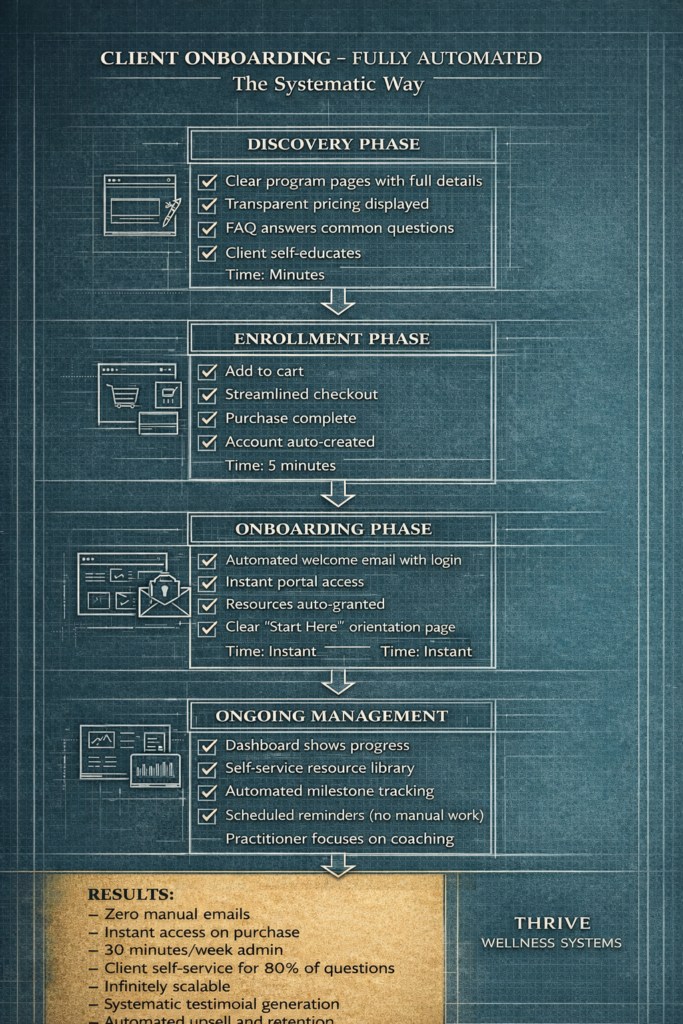
What I’m building instead:
- Discovery: Clear program pages, transparent pricing, FAQ answers common questions (minutes)
- Enrollment: Add to cart, streamlined checkout, automatic account creation (5 minutes)
- Onboarding: Automated welcome email with login, instant portal access, resources auto-granted, clear “Start Here” page (instant)
- Ongoing: Dashboard shows progress, self-service resource library, automated milestone tracking, scheduled reminders (no manual work)
- Follow-up: Automated feedback requests at program milestones, testimonial collection system, upsell sequences based on completion
Results:
- Zero manual emails
- Instant access on purchase
- 30 minutes/week admin
- Client self-service for 80% of questions
- Infinitely scalable
- Systematic testimonial generation
- Automated upsell and retention
System Design Blueprint
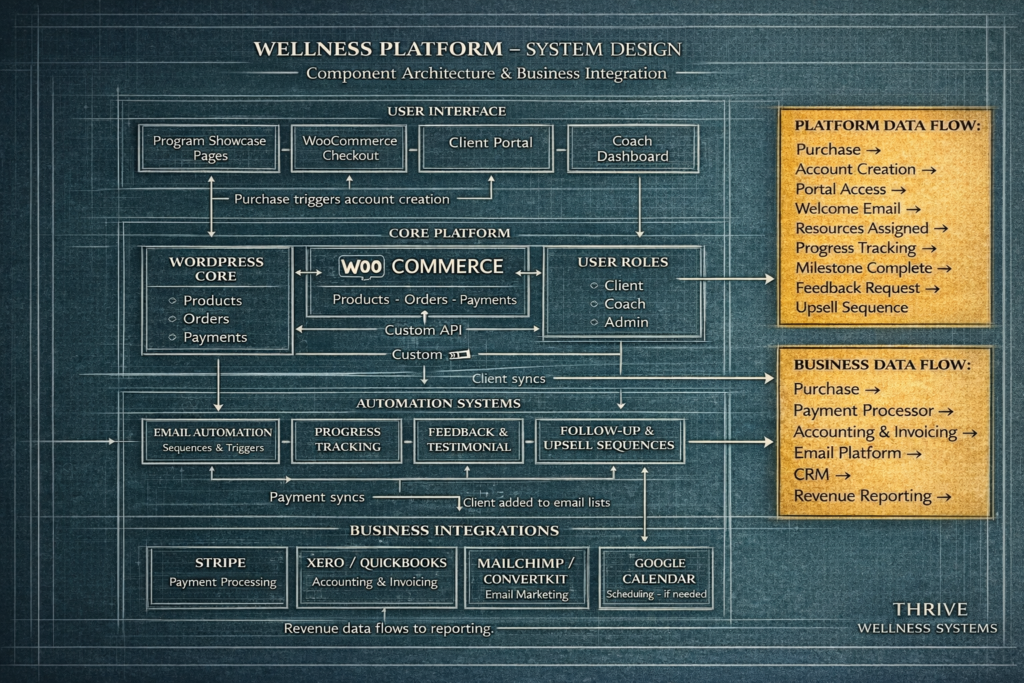
How the components connect:
This is the technical foundation. Every piece has to talk to every other piece without manual intervention. But it also has to integrate with the tools wellness practitioners are already using—accounting software, payment processors, email platforms.
Core Platform:
- WordPress core – Foundation
- WooCommerce – Products, checkout, order management
- Custom mu-plugins – User management, portal access control, automation triggers
- Client portal – Access-controlled pages and resources
- Coach dashboard – Client management and progress overview
- Email system – Automated sequences triggered by actions
- User roles – Client, coach, admin with appropriate permissions
- Feedback system – Triggered requests, testimonial collection, review generation
Business Integrations:
- Payment processing – Stripe (handles cards, Apple Pay, Google Pay)
- Accounting – Xero or QuickBooks integration (automatic invoice sync, revenue tracking)
- Email marketing – Mailchimp, ConvertKit, or ActiveCampaign (client list sync, campaign triggers)
- Calendar – Google Calendar or Calendly (if 1:1 sessions included)
- CRM (optional) – Client data sync for practices that need it
Data flow:
Purchase → Account creation → Portal access granted → Welcome email triggered → Resources auto-assigned → Progress tracking activated → Milestone completion → Feedback request → Upsell sequence
Business data flow:
Purchase → Payment processor → Accounting software (automatic invoice) → Email platform (client added to lists) → CRM updated → Revenue reporting
In my grocery business, getting this data flow wrong cost us customers. Getting it right meant payment collection went to 100% and bad debt disappeared. But the business integration was equally critical—we needed to know our numbers in real-time, not days later after manual data entry.
Why This Planning Stage Matters
The planning determines everything:
When I built my first automation systems, I didn’t plan properly. I built what I thought would work, then had to tear it down and rebuild when I discovered all the holes in the workflow. Three years of 16-hour days fixing problems I could have prevented with better planning.
Now I map every friction point before writing code. I design the system to eliminate manual work. I plan for scalability from day one. I build automation that feels personal, not robotic.
This planning stage took me 2 days. It will save me weeks in the build phase and ensure the final system actually works the way wellness coaches need it to.
What’s next:
- Part 2: Customer journey implementation (building the enrollment flow)
- Part 3: System integration (how all the pieces connect and communicate)
Ready to Stop Fighting With Half-Baked Systems?
If you’re a wellness practitioner tired of fighting with half-baked systems, this is what I build. Custom WordPress platforms designed around your actual workflow—not templates you have to bend yourself to fit.
The planning stage is where good systems are born. Everything else is just execution.
Q1 2026 projects now booking. Apply for a Project Spot →